



Web vs App Development: How to Choose the Right Path.
Web vs app development compared on cost, UX, performance and reach. Practical guidance for UK teams choosing the right delivery channel.

Web vs App Development: How to Choose the Right Path.
Most popular advice on Web vs App Development is wrong because it starts with a channel, not a user journey. A vendor tells you apps win on engagement, another tells you websites win on reach, and you're left choosing a technology before you've mapped how often people return, what they need to complete, and what friction they'll tolerate. Don't brief it that way. Decide which journeys need discovery, which need repeat authenticated use, and which genuinely need the device.
Key Takeaways
- Start with journeys, not channels: Map reach, repeat use and device capability before you commission a website, app or both.
- Use the web for discovery: Search, sharing, campaigns and occasional tasks rarely justify installation friction.
- Use an app for repeat value: Authenticated, high-frequency, offline or notification-led journeys can earn a place on the home screen.
- Set performance gates early: Field data, regression budgets and low-end Android testing belong in acceptance criteria, not post-launch fixes.
- Treat accessibility as governance: UK obligations apply across websites and apps, and updates can introduce regressions.
Why the Web vs App Question Is Usually the Wrong One
Stop asking whether you should build a website or an app. That binary forces a false choice, and it usually hides the commercial decision you actually need to make. The working question is simpler and harder. Which user journeys belong on which channel, and what evidence proves it?
A typical brief arrives pre-decided. Marketing wants an app because competitors have one. IT wants a website because it's easier to govern. Finance wants one build because two products sound expensive. None of those positions tells you whether a customer will install, return, authenticate or complete a task. You're optimising internal preference, not user behaviour.
Decide Three Things First
You need three answers before technology enters the room. First, reach. Will people find you through search, advertising, email, QR codes or shared links? If so, a browser journey has to work without installation. Second, repeat use. Will the same person return often enough that saved credentials, cached data and shortcuts repay download friction? Third, device capability. Does the core journey need camera access, biometrics, reliable offline working, background location or push notifications to function well?
If repeat use is weak and device capability isn't load-bearing, an app is usually vanity spending. Conversely, if field teams must capture evidence offline every day, a website alone will frustrate them. The answer often isn't one channel. It's a staged architecture where the web handles anonymous discovery and occasional tasks, then an app supports retained, high-frequency workflows.
Forcing every user into an app doesn't create loyalty. It creates a smaller audience, higher support costs and a download step between your customer and the task they came to complete.
Treat the channel decision as reversible and sequenced. Launch the surface that proves demand with the least friction. Instrument activation, repeat visits and task completion. Then invest in an installed experience only where behaviour shows users will repay the effort. That's not indecision. It's disciplined product management.
What UK User Behaviour Actually Tells Us
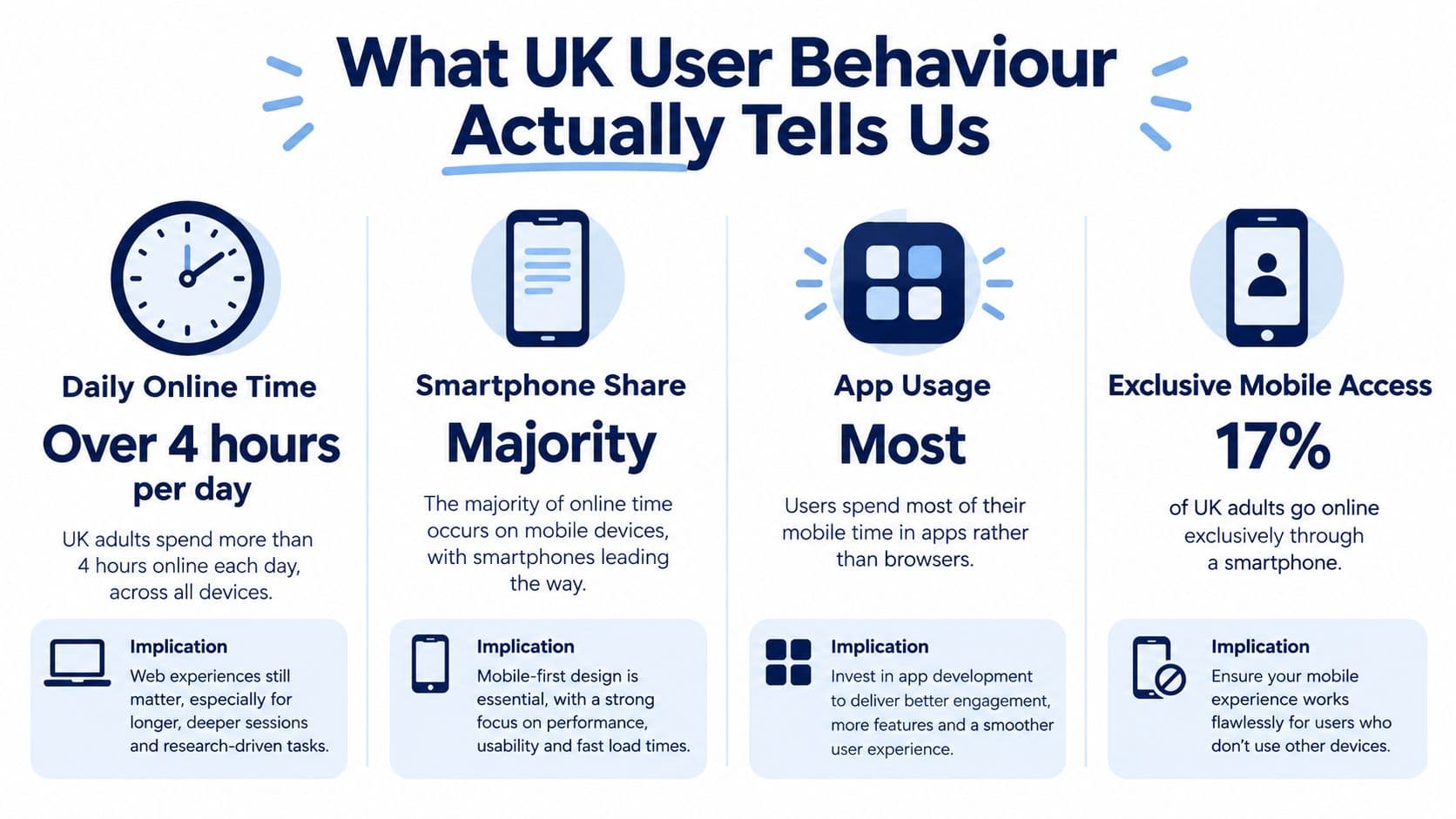
UK behaviour is mobile-first, but that doesn't make a downloadable app the default answer. The Office for National Statistics recorded daily or almost daily internet use rising from 35% of adults in Great Britain in 2006 to 82% in 2016, while mobile access on the go rose from 36% in 2011 to 70% in 2016, as shown in ONS internet access data for households and individuals. Mobile became the main route to online activity, not a secondary version of desktop.
That pattern has deepened. Ofcom reported 47.4 million UK adults online in May 2024, averaging 4 hours 20 minutes a day, with smartphones accounting for 75% of daily online time and 17% of adult internet users going online exclusively through a smartphone, according to Ofcom's Online Nation 2024 report. Read that carefully. Your mobile web experience isn't a fallback. For a substantial minority, it's the only experience they'll ever use.
What This Means for Build Decisions
Your responsive site must handle touch interaction, intermittent connectivity, constrained processors and smaller viewports without hiding essential tasks behind desktop assumptions. It also needs to be discoverable. Search and shared links can't distribute an uninstalled app journey with the same immediacy. If you haven't validated who arrives, from where and how often, start with disciplined market research before product development rather than stakeholder opinion.
Apps still matter where users return frequently, stay signed in and value notifications, stored preferences or device features. But smartphone time alone doesn't prove installation intent. People already divide attention across many apps, and a low-frequency service competes poorly for storage and home-screen space. Build for the phone first. Don't confuse that instruction with building an app first.
Comparing Web, Native, PWA and Cross-Platform Approaches
Judge each approach by the job it performs, not by a feature checklist. A website built with React, PHP, Laravel or Payload CMS gives you indexable pages, instant updates and one responsive codebase across browsers. It's normally fastest to market for content, commerce and transactional services. Its limits appear when you need dependable offline workflows, deep operating-system integration or sustained background behaviour.

Native development in Swift or Kotlin gives the closest fit to iOS and Android conventions and the strongest access to platform capabilities. You pay for that control with separate codebases, duplicated testing and two release processes. StatCounter's September 2026 figures put Android at 53.11% and iOS at 46.88% of measured UK mobile operating-system share in StatCounter UK mobile operating system data, so treating either platform as an afterthought isn't credible. That figure is dated 2026 and should be sense-checked against your own analytics before procurement.
Criterion | Web | Native | PWA | Cross-platform |
|---|---|---|---|---|
Cost shape | One build, hosting and CMS costs | Highest build and maintenance burden | Web build plus offline and install work | Shared codebase, platform exceptions remain |
Time to market | Fastest for reach-led products | Slowest where both platforms launch together | Fast, with browser constraints | Faster than dual native builds |
UX strength | Familiar, linkable, accessible | Best platform-specific polish | App-like, but inconsistent on iOS | Strong consistency with careful native bridges |
Maintenance | Central deployment | Separate updates and store reviews | Central deployment, cache governance needed | One main codebase, two store pipelines |
Recommended use | Discovery and occasional tasks | Demanding device-led products | Repeat web use with light offline needs | Most authenticated business apps |
A progressive web app narrows the gap through caching, home-screen installation and offline shells. It isn't magic, and iOS support still trails Android in areas product teams care about. Read the constraints in the progressive web app guide before promising parity. A PWA works well when repeat browser use is proven but native capability remains modest.
Cross-platform frameworks change the economics. Flutter lets a team ship iOS, Android and web from one codebase, which is why it's a strong default for many business apps. React Native suits teams invested in React, while Kotlin Multiplatform can share logic while retaining native interfaces. Choose based on team skills, plugin maturity and the device features your core journey needs, not framework fashion.
Rule of thumb: Web for reach, app for repeat behaviour, hybrid when both jobs are commercially load-bearing.
Setting Performance Acceptance Criteria Before You Build
Performance isn't polish. It's a release gate. If you don't set thresholds before development, you'll discover loading and interaction failures after the budget has been spent and the launch date has become political.
Only 48% of mobile websites and 56% of desktop websites passed all three Core Web Vitals in 2025, according to UK web design statistics synthesising Chrome UX Report and HTTP Archive data. That should end any assumption that a standard mobile web build will naturally feel fast. Specify field measurement by device class and connection quality, not a single laboratory score taken on an office network.
Gates for Web Builds
Track Largest Contentful Paint, Interaction to Next Paint and Cumulative Layout Shift on priority templates and complete task journeys. Segment UK traffic, device capability and connection quality. A fast homepage doesn't excuse a checkout, booking or application form that shifts content while someone tries to tap submit. Use browser performance testing practices during development so regressions surface while they're cheap to fix. Technical foundations also affect machine readability, and the agent-readiness technical standards guide is a useful companion when you're defining crawlable, well-structured delivery requirements.
Gates for App Builds
An app doesn't eliminate performance engineering. It moves the failure points. Set budgets for cold-start time, binary size, memory use, API latency, battery consumption, offline recovery and low-end Android behaviour. Test on representative devices your UK audience owns, not only flagship handsets. Define what happens when connectivity drops halfway through a form or payment.
- Instrument real users: Collect field metrics from beta release onward.
- Set regression budgets: Block releases that breach agreed thresholds.
- Test complete journeys: Measure sign-in, search, transaction and recovery paths, not isolated screens.
- Review monthly: Assign an owner who can delay features when performance debt grows.
When Each Channel Earns Its Place
Lead with the web when discovery and low-friction access drive value. That includes SEO-led services, public information, campaign landing pages, infrequent transactions, account recovery and journeys shared by email or social media. A user who needs to renew something occasionally shouldn't have to find an app store, remember a password and accept permissions before starting.
GOV.UK illustrates the scale difference. It recorded 1 billion visits and 2.3 billion page views in 2025, with 61% of monthly visits from mobile devices by December, while its app had 316,000 downloads and 85% of users customising it, as reported in GOV.UK's analysis of how people used the service in 2025. The web delivers universal reach. The app creates persistence for an opted-in audience. Neither number makes the other channel redundant.
Where an App Wins
Commission an app when users return frequently and stored state removes real effort. Utility customers checking orders, workers receiving assignments, members managing identity documents and patients following a programme can all justify installation if the service becomes easier after sign-in. Device features strengthen the case further. Camera capture, biometrics, notifications, location, secure storage and offline queues should improve the core task, not sit in a roadmap as decorative capability.
For service design context, compare mobile app development services with web development services, then test your assumptions against products such as Boiler Juice, Findr, Deploy, My Pension ID and Adaptwell. The useful question isn't whether they're labelled web or app. It's whether repeat behaviour and task complexity justified the delivery model.
Where Hybrid Wins
Most mature products need both surfaces. Use the responsive web for anonymous acquisition, help content, payments and occasional tasks. Use the app for authenticated repeat workflows, saved preferences, notifications and device integration. Preserve progress when users switch channels, and don't punish browser users with deliberately degraded functionality unless the device can't support the task.
Measure installation-to-activation rate, repeat task frequency, permission acceptance and incremental conversion. Download volume alone tells you very little. An app earns its place when retained users complete valuable tasks more successfully than they did on the web.
A Decision Framework Your Team Can Use This Week
Run this framework in one workshop, then validate the answers with analytics and user interviews. Don't let the loudest stakeholder substitute preference for evidence.
Three Questions, Answered Honestly
How often will a typical user return? Occasional use points to the web. Daily or weekly repeat behaviour may justify an app, provided each return delivers value. Look at existing visit frequency, account activity and task intervals. If you don't have a product yet, examine comparable behaviour in your current service and state your assumptions plainly.
What device capability does the core journey need? List the capability, the user benefit and the browser alternative. Camera upload may work adequately on the web. Reliable offline data capture, biometric approval or background notifications may not. If removing the device feature breaks the proposition, you've found an app requirement. If it merely makes a demonstration look impressive, cut it.
What's the cost of acquisition friction? Model the steps between first click and first completed task. Search result to web page is short. Search result to store listing, download, registration, permissions and onboarding is not. That friction must be repaid quickly through faster repeat access or materially better task completion.
Public-sector and commercial examples make the split tangible. Edinburgh Council suits broad browser access, while data-heavy products such as H2OiQ and content platforms such as Cultaholic raise different questions about discovery, repeat visits and retained state. Arch builds responsive websites and cross-platform apps, including Flutter products, so it's one option when you need both channels designed as a single service.
Validate before committing to a full native build. Prototype the riskiest journey, test it on representative devices and measure completion against the web baseline. A short discovery sprint is cheaper than maintaining an installed product nobody needed.
The commonest mistake is treating the channel choice as permanent. Stage it, measure behaviour, then expand only where users prove the case.
Accessibility, Privacy and Compliance on Both Channels
Choosing a website doesn't avoid UK compliance, and choosing an app doesn't create a separate ethical universe. You need governance for every surface users touch.
The Public Sector Bodies Accessibility Regulations 2018 came into force on 23 September 2018 and apply to covered public-sector websites and mobile apps, with government guidance identifying WCAG 2.2 AA as the relevant target, as set out in UK accessibility requirements for public sector websites and apps. Test each implementation in its real environment. An accessible website doesn't prove the companion app works with a screen reader, switch control or enlarged text.
Recent UK government evidence says around 15% of people cannot complete foundational digital tasks and a further 6% are completely offline, while disabled users report services becoming inaccessible after updates, according to the UK digital inclusion report for disabled adults. That matters commercially as well as legally. App-store installation, limited storage, permissions and frequent updates can exclude users a browser journey would serve. Keep an accessible web route where the service is essential, and test accessibility after every material release.
Privacy shapes architecture too. The ICO Age Appropriate Design Code contains 15 standards, including high-privacy defaults, data minimisation and geolocation off by default, as summarised in UK guidance on child online safety and privacy. The ICO also states one in five UK internet users are children in its Age Appropriate Design Code guidance. If children are likely to access your service, age assurance, analytics, nudges and location features need design attention on web and app alike. Build compliance into discovery, not legal review at the end.
Budget Envelopes, Timelines and Frequently Asked Questions
Any supplier who gives you a fixed price before understanding integrations, content, authentication and compliance is guessing. Budget by product shape instead. A focused marketing or transactional website sits at the lower end because one responsive codebase and central deployment reduce duplication. A PWA adds offline design, caching and install testing. Cross-platform costs more than web because you're funding app-store pipelines, device testing, notifications and release management. Dual native builds carry the heaviest envelope because design, engineering and quality assurance are repeated across platforms.
Timelines follow the same logic. Discovery should validate the riskiest journey, technical integrations and channel assumptions before build. A lean MVP then proves one complete task for one priority audience. Don't compress discovery to protect a launch date, then spend the saved time rebuilding the wrong channel. Your team needs product ownership, UX design, engineering, quality assurance and someone accountable for analytics, accessibility and release governance after launch.
Plan maintenance from day one. Websites need hosting, security updates, CMS governance and performance monitoring. Apps need operating-system updates, store compliance, crash monitoring, device testing and periodic dependency upgrades. If you can't fund that ownership, narrow the product. When you're ready to test the decision with a delivery team, contact Arch about your product with your priority journeys and current analytics, not just a feature list.
Frequently Asked Questions
When should we choose Flutter specifically?
Choose Flutter when you need iOS and Android apps with a consistent interface, shared business logic and one main codebase, and when your required device features are supported by mature packages or manageable native bridges. It's particularly suitable for authenticated business, utility and workforce products. Prototype the riskiest integration first. If your product depends heavily on new platform features or highly specialised native behaviour, compare that prototype against Swift and Kotlin before committing.
Can a PWA replace our native app?
A PWA can replace a native app when users mainly need repeat browser access, light offline support, home-screen entry and standard web capabilities. Test the complete journey on iOS and Android because support for installation prompts, notifications, storage and background behaviour isn't identical. If reliable offline capture, biometrics or deep operating-system integration is essential, keep the native or cross-platform app. Don't promise parity based on a desktop browser demonstration.
Should we rebuild an underperforming app as a website?
Don't rebuild until you've diagnosed why the app underperforms. Examine installation-to-activation rate, repeat task frequency, permission refusal, accessibility defects, crash data and support demand. If users need the service only occasionally, migrating priority journeys to a fast responsive website may remove friction and reduce maintenance. If retained users still need offline work or notifications, keep a narrower app for them and move discovery, help and low-frequency tasks to the web.
About the Author
Hamish Kerry is the Marketing Manager at Arch, where he's spent the past six years shaping how digital products are positioned, launched, and understood. With over eight years in the tech industry, Hamish brings a deep understanding of accessible design and user-centred development, always with a focus on delivering real impact to end users. His interests span AI, app and web development, and the potential of emerging technologies. When he's not strategising the next big campaign, he's keeping a close eye on how tech can drive meaningful change.
If you're deciding between a responsive website, a cross-platform app or a staged combination, bring us the journeys, analytics and constraints before you commit the build budget. We'll help you test the riskiest assumptions, define performance and accessibility gates, and design the channel split around repeat behaviour. Start the conversation with Arch.